
A website redesign is often treated as a visual project. New typography, stronger images, modern layouts, and improved navigation matter, but search engines and customers experience much more than the appearance. They depend on URLs, page meaning, internal relationships, response codes, structured data, accessibility, forms, speed, and continuity.
When those elements are ignored, a beautiful launch can create a sudden decline in organic traffic and qualified leads. Search engines encounter missing pages, unfamiliar paths, weakened content, conflicting canonical tags, and broken internal links. Customers encounter forms that do not reach the CRM, tracking that no longer records conversions, or mobile experiences that look polished but are difficult to use.
This website redesign SEO migration checklist explains how to protect existing value while building a better foundation for future growth. It applies to a domain change, platform change, information architecture update, major content rewrite, or complete website redesign and development project.
Why website redesigns lose SEO visibility
Search engines learn a site over time. Each useful URL accumulates signals from content, internal links, external links, user behavior, structured data, and historical discovery. A redesign can interrupt those signals in a single deployment.
Common losses occur when established URLs return 404 errors, many pages redirect to the homepage, useful copy is shortened, title tags become generic, headings change without preserving intent, JavaScript hides important content, staging noindex directives reach production, or the XML sitemap contains the wrong URLs.
The damage is not always immediate. A site may appear normal on launch day while Google gradually recrawls old URLs and discovers the changes. That is why the project needs a benchmark before launch and monitoring for several weeks afterward.
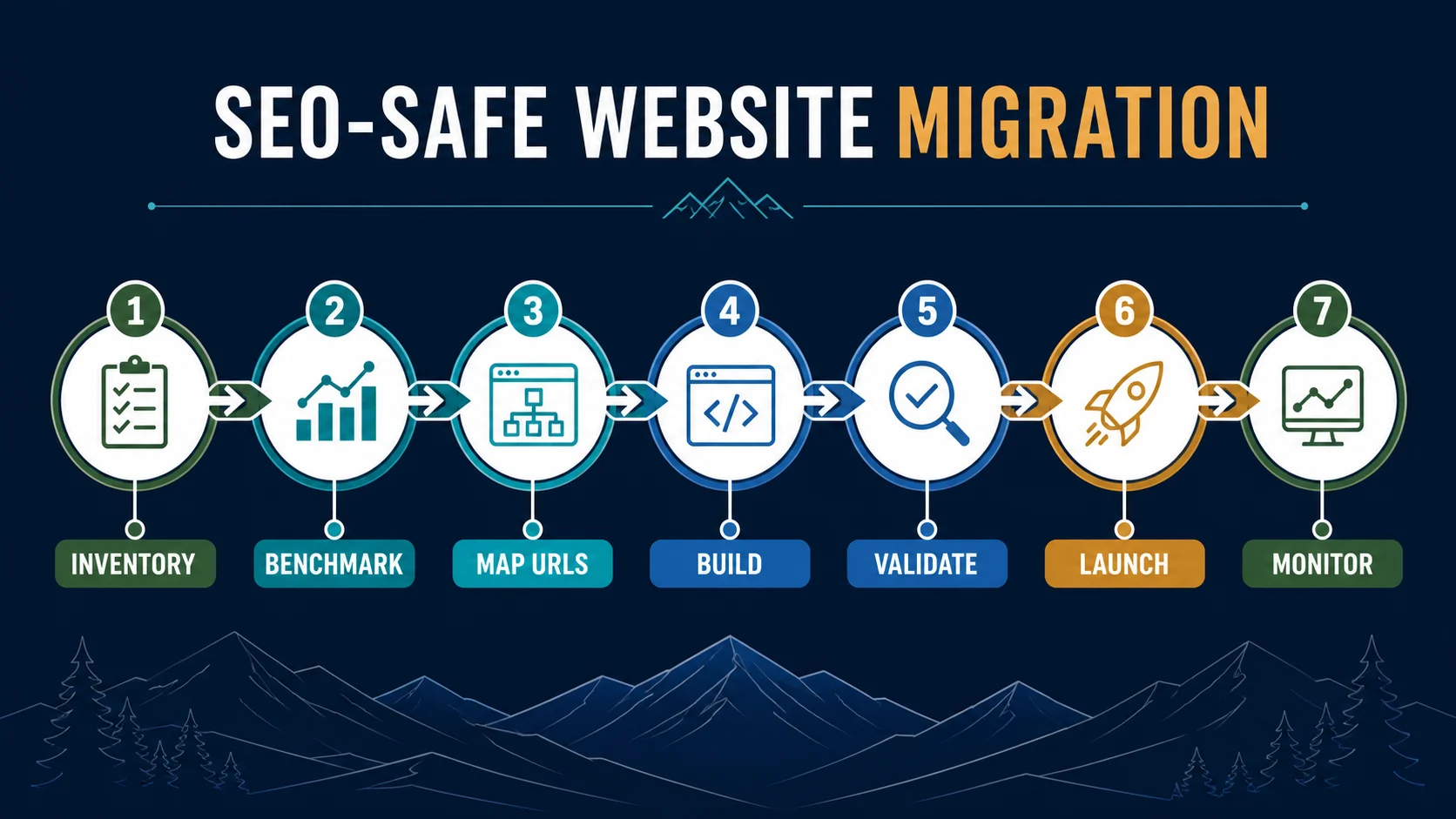
Stage 1: inventory the complete existing website
Start with a crawl of the current public site. Export every indexable URL, page title, meta description, canonical tag, heading, status code, word count, internal link, image, and structured-data type that can be captured. Combine the crawl with URLs from the XML sitemap, Google Search Console, analytics, backlink tools, paid campaigns, CRM records, and server logs when available.
Do not assume the navigation represents the full site. Older articles, campaign pages, files, project pages, and orphaned resources may receive traffic or links even when they are difficult to find. Record PDFs, images, and other assets that have earned backlinks. Capture current robots directives and redirect rules.
The inventory becomes the source of truth. Each URL should receive a decision: preserve, improve, consolidate, redirect, archive, or intentionally remove.
Stage 2: benchmark search, conversion, and revenue performance
Before changing anything, record what currently works. Export at least 12 months of landing-page clicks, impressions, queries, average positions, organic sessions, engaged sessions, conversions, and revenue or qualified opportunities when available. Note seasonality and recent algorithm changes that could distort comparison.
Benchmark core web performance, mobile behavior, accessibility, form completion, call tracking, and speed to lead. Identify the pages responsible for the majority of organic entrances and conversions. A page with modest traffic may still be important if it consistently creates qualified opportunities.
Take screenshots of priority pages and save the rendered HTML or source where practical. Preserve title tags, descriptions, headings, schema, body content, and internal links for high-value URLs. A migration should make deliberate changes, not depend on memory after the old site is gone.
Stage 3: map every legacy URL to the right destination
A redirect map connects each old URL with its most relevant new URL. Preserve the exact path when it still describes the content accurately. When a page moves, use a permanent 301 redirect to the closest equivalent destination. Avoid redirecting unrelated pages to the homepage because that provides little value to the visitor and may be treated like a soft 404.
Consolidation can improve a site when several weak pages compete for the same intent. Combine their useful information into one stronger destination, redirect the retired URLs, and update internal links. Remove a page without a redirect only when it has no meaningful traffic, links, replacement, legal need, or customer value.
Normalize protocol, hostname, trailing slash, capitalization, parameters, and duplicate paths. Redirect chains should be replaced with direct one-hop rules. Test the map against both the old crawl and the new route list before launch.
Stage 4: preserve intent while improving content
A redesign is an opportunity to improve weak content, but priority pages should not lose the information that made them relevant. Compare the old and new version side by side. Preserve the central topic, useful details, supporting questions, proof, internal links, and local context. Strengthen clarity, evidence, conversion paths, and readability.
Every indexable page should have one descriptive H1, logical H2 and H3 headings, a distinct title tag, and a useful meta description. Titles and headings should reflect real customer language without forced repetition. Service pages should explain audience, problem, process, deliverables, fit, and next step. Local pages should demonstrate authentic relevance to Denver or the applicable service area.
Images need descriptive file names and alternative text when they convey information. Decorative images should use empty alt attributes. Articles and project content should retain publication data, authorship when relevant, categories, featured images, and social-sharing metadata.
Stage 5: validate the technical SEO foundation
Review the staging site with a crawler before launch. Confirm that indexable pages return 200 status codes, canonical tags point to the intended production URLs, internal links resolve directly, and metadata renders in the page source. Validate Organization, LocalBusiness, Service, Article, BreadcrumbList, FAQ, and other appropriate schema against visible content.
Check the XML sitemap, robots.txt, llms.txt if used, favicon, web app icons, Open Graph images, X cards, and social previews. Verify HTTPS, hostname redirects, and canonical domain behavior. Error pages should return true 404 status codes. Search and filter pages should follow an intentional indexation policy.
Staging should remain blocked from indexing, but the production launch must remove staging-only noindex directives, authentication, and robots restrictions. This single checklist item prevents one of the most damaging migration mistakes.
Protect mobile usability, accessibility, and performance
Search safety and user experience are connected. Test responsive layouts at common and narrow viewport widths. Navigation should close after a mobile selection, controls need useful labels, focus order should be logical, and content should remain readable without horizontal scrolling.
Meet current WCAG expectations for contrast, keyboard access, visible focus, form errors, headings, landmarks, alternative text, motion preferences, and modal behavior. Compress images, reserve their dimensions, reduce unnecessary scripts, cache static assets, and monitor Core Web Vitals. The largest visual element should load quickly without causing layout movement.
Protect forms, CRM workflows, and lead attribution
A migration is incomplete until every conversion path works. Submit each public form from a production-like environment. Confirm server-side CAPTCHA verification, validation messages, consent handling, CRM ingestion, email notification, duplicate handling, routing, source attribution, and thank-you behavior.
Test phone links, scheduling links, downloads, and ecommerce or application flows. Analytics should record the important event once, not zero times or twice. Preserve campaign parameters and first-party source data when a visitor moves between pages or systems.
This operational testing is essential to lead leakage reduction. Rankings are valuable only when the resulting inquiry reaches the right person with enough context for timely follow-up.
Stage 6: execute a controlled launch
Choose a launch window when technical, marketing, and operational owners can respond. Back up the current site and redirect configuration. Lower DNS time to live in advance if the infrastructure requires it. Freeze nonessential content changes while the final crawl and map are approved.
After deployment, immediately test the homepage, priority landing pages, robots.txt, sitemap, canonicals, analytics, forms, redirects, and 404 behavior. Crawl the production domain using the old URL list. Check certificate behavior and redirects for HTTP, HTTPS, www, and non-www variations.
Submit the new sitemap in Google Search Console and Bing Webmaster Tools. Inspect several priority URLs. Do not request indexing for every page indiscriminately. A clean sitemap, strong internal links, and correct redirects provide the systematic discovery path.
Stage 7: monitor the first 90 days
During the first week, review crawl errors, form delivery, analytics events, server errors, indexation, redirect failures, and priority-page visibility daily. Compare results with the benchmark, but expect normal volatility while search engines process the migration.
During the first month, review landing-page clicks, impressions, queries, conversions, and leads weekly. Identify old URLs still receiving traffic or links without a correct redirect. Look for unexpected canonical choices, duplicate pages, excluded URLs, and structured-data errors.
At 30, 60, and 90 days, compare performance by page group and customer intent. Investigate meaningful losses at the URL level. Avoid changing the entire site again in response to a few days of movement. Diagnose whether the cause is technical, content-related, seasonal, competitive, or external before acting.
Local SEO migration checks for Denver companies
If the address, phone, domain, brand name, or service area changes, update Google Business Profile and authoritative citations after the production site is stable. Keep the official name, address, phone, hours, and primary category consistent. Update social profiles, maps, industry directories, and major partner links.
Preserve valuable Denver and Colorado content when it reflects genuine experience. Retain local case studies, service-area explanations, reviews, and community references. A redesign should strengthen local credibility, not replace it with generic national copy.
Common website migration failures
- Launching without a complete old-URL inventory
- Redirecting every retired page to the homepage
- Removing useful content to create a cleaner visual layout
- Leaving staging noindex rules on production
- Changing URLs, titles, content, platform, and domain without a benchmark
- Forgetting forms, CRM routing, call tracking, or analytics events
- Publishing incorrect canonical tags or an outdated sitemap
- Stopping monitoring immediately after launch
A strong migration supports a broader connected digital growth system. The website, search visibility, CRM, automation, and measurement should launch together so the company can see how discovery becomes pipeline and revenue.
Frequently asked questions
Will a website redesign hurt SEO?
It can, but loss is not inevitable. A complete inventory, preserved search intent, accurate redirects, technical validation, and post-launch monitoring can protect existing value while the new site improves.
Should URLs change during a redesign?
Keep established URLs when they remain accurate and useful. Change a URL only for a clear information-architecture reason, then apply a direct permanent redirect from the old path to the most relevant new destination.
How long should website redirects remain active?
Keep important permanent redirects indefinitely when practical, especially for URLs with traffic, backlinks, bookmarks, citations, or historical campaign use.
How long does SEO recovery take after a migration?
Search engines may process a clean migration within several weeks, while complex sites can take longer. Timing depends on site size, crawl frequency, the scale of change, redirect quality, and content continuity.
What data should be saved before replacing an old website?
Save a complete crawl, XML sitemaps, redirects, metadata, content, analytics, Search Console exports, backlink data, form configurations, schema, media, and screenshots of priority pages.
Who should own an SEO migration?
The work should have one accountable migration lead with direct participation from SEO, development, content, analytics, design, operations, and the people responsible for CRM and lead response.
PLANNING A REDESIGN?
Launch a better website without abandoning the value you already earned.
Denver Media Group combines web design, development, SEO migration, accessibility, performance, analytics, and CRM integration in one launch plan. We can inventory the existing site, create the redirect map, protect priority content, and validate the complete customer journey.
Plan an SEO-safe website redesign